 Tideline
The window
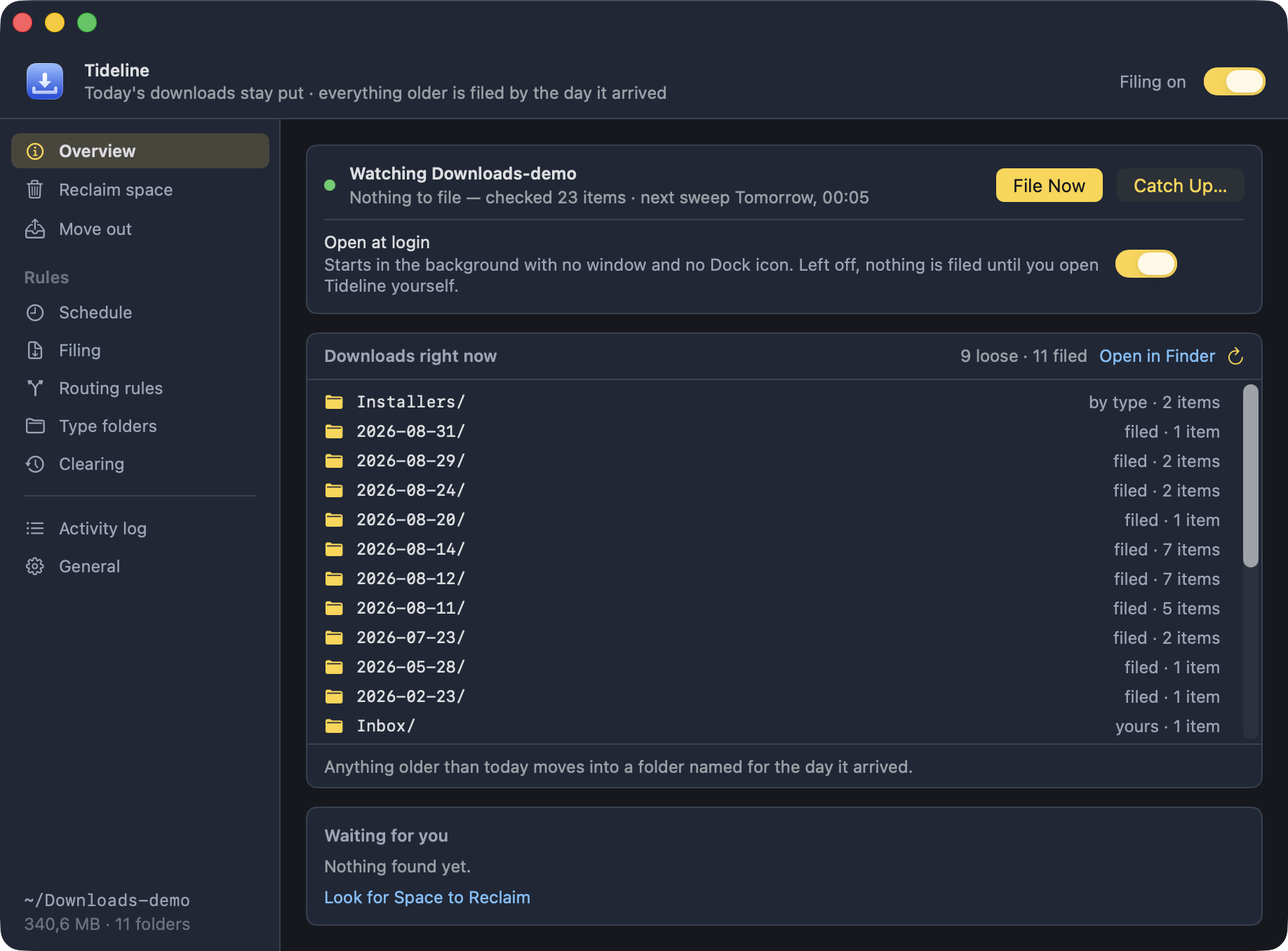
A band across the top that stays put, a sidebar down the left, and one pane at a time beside it.
The band holds the app's name, what it does in one line, and the master on/off switch. If macOS is blocking access, an orange banner sits under it, above everything. The sidebar's foot always says which folder this is all about and what it is holding, whichever pane is open.
The colours mean something
The palette is the app's own rather than the system accent — #ffd43b,
from the
Demo Time theme.
It still follows Light and Dark mode: every colour has both.
- Yellow marks what Tideline put there and what it is about to touch — a filled button, the selected pane, the folders it made, a file due to move.
- Red is kept for faults.
- Blue is a button that only navigates.
- Green is running and watching.
Overview
Whether filing is on, when it last ran, what it did, and when the next sweep is due — or Not filing yet and a Start Filing… button, until the question on First launch has been answered.
File Now runs a sweep immediately; Catch Up… is beside it once a type folder is switched on. Open at login sits in the same card, because filing only happens while the app is running and that switch decides whether it is.
The folder as it stands
Under that, right now: the type folders, the dated folders newest first, then whatever is still loose, each one saying what it is and whether the next sweep would move it.
The window used to draw a sketch of a tidy Downloads folder here, which was the same picture whatever was actually in there; this is the real one. What it marks as due comes from the same planner a sweep uses, so the panel and a sweep cannot disagree about a file.
Move out
Its own pane, above the rules: the starting points a rule gives you, the places things can go, and every batch that has already left with a Put Back beside it. The whole of it is on Move out.
Waiting for you
Across the bottom: what the scans turned up, how much of it could go, and a link straight into the review that deals with each. Filing tidies a folder; it does not shrink one, and this is the line that says so — the whole of it is on Reclaim space.
The folder's own size is in the corner of the sidebar, where it is true on every pane.