 Tideline
The menu bar
Closing the window drops the Dock icon; the app keeps running and keeps filing. The menu bar icon stays.
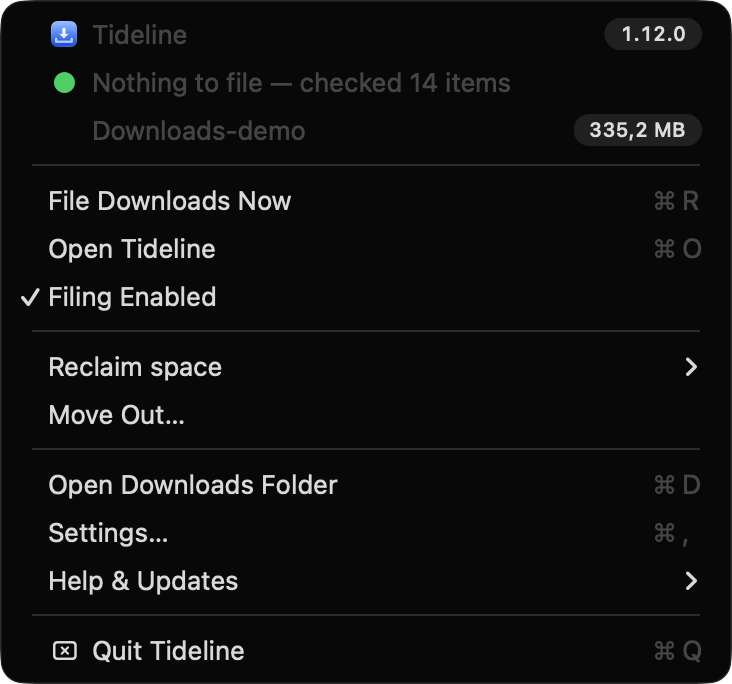
Its menu opens with the name and version, then the last run and what the folder is holding, followed by File Downloads Now, Open Tideline, a Filing Enabled switch, Reclaim space, Move Out…, Open Downloads Folder, Settings…, Help & Updates and Quit.
Shortcuts
| Item | Key | What it does |
|---|---|---|
| Open Tideline | ⌘O | Brings the window up on whichever pane you left it on |
| Settings… | ⌘, | Opens the same window on Filing, since the rules are what you press ⌘, looking for |
| Open Downloads Folder | ⌘D | Finder, on the folder Tideline is filing |
Reclaim space
Holds the three reviews — Duplicates, Large files and Old dated folders — with Review All in Tideline… at the foot, which opens the pane and starts the scans.
The menu itself never scans and quotes no figures: what it could show would be as old as the last time the window was open. All three Review… items bring the window up on their sheet rather than removing anything where you cannot see it. Review Old Folders… is greyed out while clearing is set to Never.
Move Out…
Sits with the reviews rather than with the sweep, because it behaves like them: it brings the window up on its sheet, finds things and asks. Unlike a sweep it never acts on its own, and nothing leaves the folder without being ticked first. See Move out.
Help & Updates
Holds Check for Updates…, Send Feedback… and Tideline on GitHub, and wears a badge when there is a new version. Check for Updates… reads Update to 1.3.0… once a check has found one, so a new version is visible without opening the window. See Updates.
What File Downloads Now reads
- While preview mode is on it reads Preview a Sweep…, and opens the window on the sheet that lists what a sweep would have moved.
- Before filing has been agreed to it reads Start Filing… and opens the window on the question, which is the only thing that ever starts a sweep.
The folder size beside the icon
The size can sit next to the icon as well as inside the menu — General › Other › Show the folder size in the menu bar, off by default.